Nano Banana 2.1: Google taught its image model to edit photos without breaking them
Google released Nano Banana 2.1, an image model that edits photos without touching the rest of the frame, produces more natural shots and costs four times less than Nano Banana Pro. Here is what changed, what the numbers mean and how it works on ChatPlus, where it has already replaced the original Nano Banana.
Ask an AI model to put a hat on the person in your photo, and there is a good chance you get a different person wearing a hat. The nose shifts a little, the gaze changes, the mug on the table loses its handle. That is the core problem with AI photo editing, and it is exactly what Google went after with Nano Banana 2.1.
The model came out on October 6. Google promises three things: edits that leave the rest of the frame alone, more natural images without the glossy AI sheen, and a price half that of Nano Banana 2. On ChatPlus, Nano Banana 2.1 already runs in place of the original Nano Banana. Below: what the model is, what is new and how to use it.
Where the "banana" came from
Nano Banana started as an internal nickname and later became the official name of Google's image models. The first one shipped in late summer 2025 under the dull name Gemini 2.5 Flash Image and went viral fast: people turned their photos into collectible figurines, and social feeds were full of them for weeks. The nickname stuck, and Google started using it itself.
Then came Nano Banana Pro, the heavy and expensive version for complex scenes, and Nano Banana 2, the fast and cheap one. Version 2.1 continues the line. It is a reasoning model from the Gemini 3 family: before it draws, it thinks the scene through. What stands where, who looks at whom, where the light comes from. That is why composition and small details hold up better than in models that start drawing right away.
What is new in 2.1
Edits that do not spill over
Editing is the headline. Google trained the model to change only what you asked for. Switch the season, change someone's outfit, remove a passer-by from the background, and faces, poses, objects and lighting stay as they were.
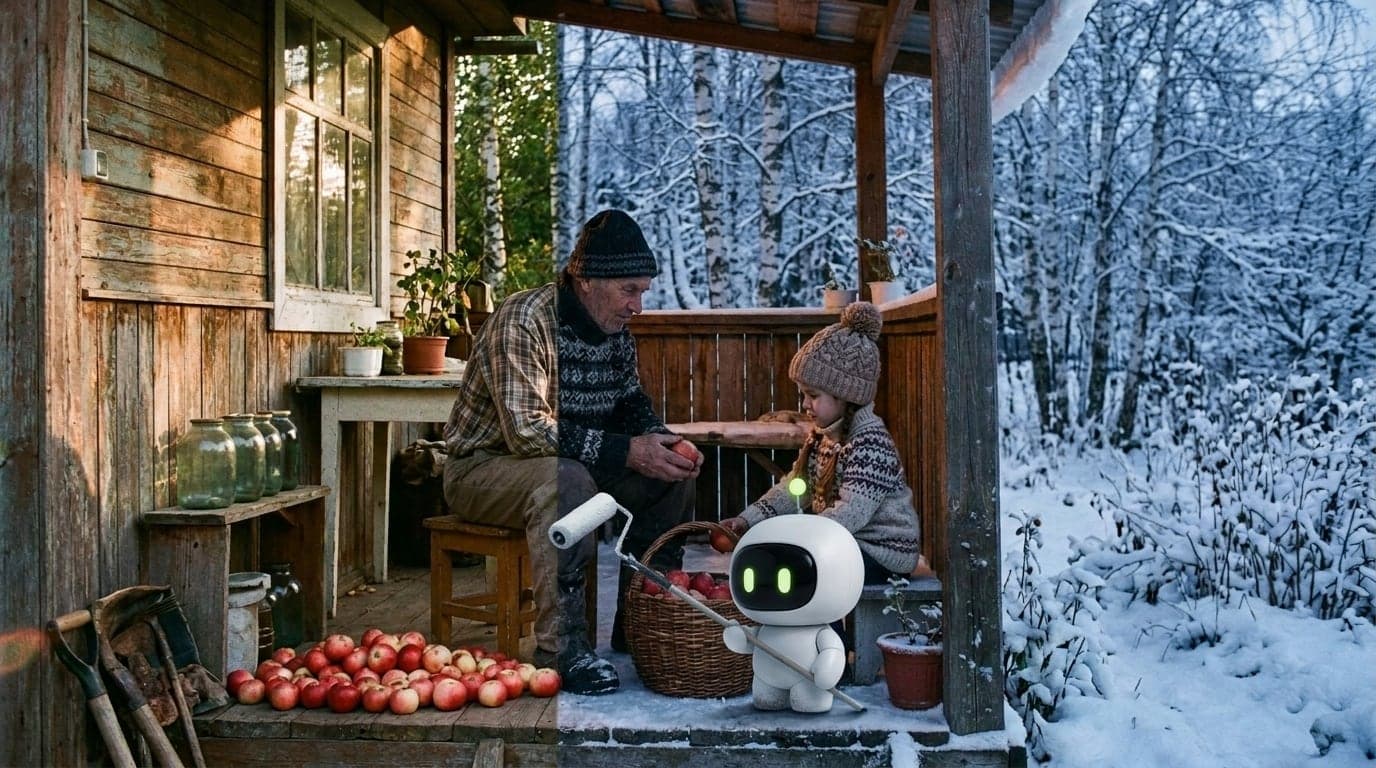
We tested it on our own picture: a grandfather and his granddaughter sorting apples on a cottage porch in summer. We asked for a winter evening instead. The model covered the porch in snow, turned on the light in the window and dressed both of them in sweaters and hats. But the grandfather sits on the same stool, the basket is in the same spot and the apples lie in the same pile by the steps. The cover of this article is that same pair, joined along one line straight through the grandfather: the original on the left, the edit on the right. The two shots match down to the logs, so the seam is barely visible until it reaches the clothes and the snow. Nano Banana 2.1 also drew Max and his paint roller in.
In Google's own apps you can also edit with a mask: brush over an area and the model touches only that. On ChatPlus you describe edits in words; our editor has no mask tool yet. Even without one, the model usually understands what you want to change.
Shots that look like photos
The second promise is a natural look. Image models have a recognizable signature: skin that is too smooth, light that is too perfect, everything coated in varnish. Google says 2.1 gets closer to what comes out of an ordinary camera, with real skin texture, uneven light and everyday clutter in the frame.
It shows in our tests. A woman making pastries in her kitchen came out with flour on her cheek, messy hair and old enamel pots on the shelf. It looks like a film snapshot, not a studio ad.
The same characters every time
The third is consistency. The model keeps the look of up to four characters and up to ten objects from one image to the next. For a storyboard, a comic or a set of product cards, that matters more than any polish: if the hero has a new face in every frame, the series falls apart.
The model also renders text in images more cleanly and handles infographics better. And on very wide formats such as 21:9, it no longer repeats the same chunk of the scene across the frame, which panoramas used to suffer from.
What the numbers say
Google compared 2.1 with its two predecessors. The results are Elo ratings, as in chess: the higher the number, the more often a model wins a head-to-head comparison.
| Task | Nano Banana 2.1 | Nano Banana 2 | Nano Banana Pro |
|---|---|---|---|
| Photo editing | 1026 | 938 | 939 |
| Several characters in a scene | 1106 | 978 | 1011 |
| Mask editing | 1049 | 965 | 927 |
A gap of 90 to 130 points is large. In plain terms, against Nano Banana 2 the new model wins roughly six or seven times out of ten. Interestingly, Pro, the most expensive model in the line, loses to the new version on edits by almost the same margin.
The usual caveat applies: Google ran these tests itself. Treat them as a direction and judge by your own images.
What it costs
Through Google's API the new model costs $1.50 per million input tokens and $30 per million output image tokens. Per picture, that comes to about 3.4 cents at 1K resolution, 5 cents at 2K and 7.6 cents at 4K. That is half the price of Nano Banana 2 and a quarter of Nano Banana Pro.
For you it means something simple: the model got better and the price did not go up. On ChatPlus, Nano Banana 2.1 costs the same 20 media credits per image as the original Nano Banana.
How it works on ChatPlus
Nano Banana 2.1 replaced the original Nano Banana. If you had it selected in the image generator, you do not need to do anything: your next image already comes from the new version. Images in your history stay as they were.
You can draw from scratch with a text description or start from your own photo: upload it and write what to change. One request takes up to ten photos, and the model can combine them into one scene or move an object from one shot to another. Pick the frame in the settings: square, vertical 9:16 for stories, wide 16:9 and 21:9, or the proportions of your original photo. Images come out at 1K, which is enough for social media, a website or a slide deck.
Open Nano Banana 2.1 on ChatPlus and the model will already be selected in the generator.
How to ask for edits that work
Say what to keep. "Make it a winter evening, keep the people and objects unchanged" works more reliably than just "make it winter."
One edit per request. If you need a new background, new clothes and new lighting, go step by step. The narrower the task, the more precise the model.
Describe the result, not the action. "A blue mug stands on the table" is clearer than "replace the mug with another one."
For a series, attach the same photo of your character to every request. The look drifts less, even when the scenes are completely different.
When to pick a different model
Nano Banana 2.1 is not the only image model on ChatPlus, and you do not have to use it for everything.
If you need text in the image, such as a sign, a cover or a greeting card, try GPT Image 2 from OpenAI. It is our default and handles lettering well. For product shots, landscapes and anything where light and texture matter, Flux 2 Pro is a strong choice: it renders up to 4 megapixels, enough to send to print.
Nano Banana 2.1 is the one for photo edits, lifelike scenes with people and series with the same characters. All three models are in the image generator, and you switch between them in one click.
In short
Nano Banana 2.1 is Google's new image model, released on October 6, 2026. It edits photos without touching the rest of the frame, produces more natural shots and keeps the same characters consistent across a series. By Google's measurements it beats both Nano Banana 2 and Pro at editing while costing half and a quarter as much. On ChatPlus it has already replaced the original Nano Banana at the same price: 20 media credits per image.